Best Desktops in India
Top 5 Models That Actually Deliver — From Budget Workhorses to Gaming Beasts
Desktop computers don’t get the attention they deserve. In this era of ultra-thin laptops and foldable phones, simple desktop computers are quietly evolving – with more power, better displays and smarter designs than ever before. Computing has come a long way from the days of old, bulky computers kept in offices to the present day.
There’s a remarkable range of desktop computers today: attractive all-in-one computers that double as home decor, compact towers that consume little power even while running heavy software, and gaming rigs that look like something out of a science fiction movie. The Indian desktop market is expected to grow particularly rapidly in 2026, with brands like HP, Dell, Lenovo and ASUS competing aggressively on price, performance and availability on Amazon India, Croma, Reliance Digital and Vijay Sales.
Whether you’re setting up a home office, upgrading your child’s study, editing videos on the weekends, or building a great computer for gaming – there’s bound to be a desktop computer on this list. And we’re not just here to list specifications. We’ll honestly tell you what’s good, what’s not, and what each computer is really meant for.
We’ve done extensive research – thoroughly studying reviews from thousands of verified buyers,
Best Desktops in India
Our Top 5 Picks at a Glance
The Top 5 Best Desktops in India
HP 27-cr1027in (All-in-One)
The Clean Desk Dream That Actually Works
Price: Rs. 96,379
Storage / RAM: 1 TB SSD / 16GB || Display: 27-inch FHD IPS
Processor: Intel Core Ultra 5 || GPU: Intel Integrated Graphics
Best for: Everyday use, home office, students

What We Like –
To be honest, most people don’t need a gaming GPU or server-grade processors. They want a machine that boots quickly, runs 47 browser tabs smoothly, handles video calls without lag, and looks good on a desk. The HP 27-cr1027in does all of that, and does it beautifully.
Its 27-inch IPS display is its biggest highlight. It’s large enough for multitasking, its colour reproduction is accurate enough for viewing everyday content, and the anti-glare coating keeps the screen from glare like glass even in bright light. Placing it on a home office desk or a student’s study table makes viewing everything from spreadsheets to YouTube a breeze.
This Intel Core Ultra 5 represents Intel’s modern efficiency-focused architecture. This chip generates less heat, consumes less power, and handles desktop workloads like documents, browsing, streaming, video calls, and other common desktop tasks without hesitation. Its all-in-one design keeps it the tidiest: just one power cable, no tower on the floor, and no clutter of cables.
With 16GB of RAM and a 512GB SSD, this machine feels incredibly fast for everyday tasks. Thanks to the SSD, videos load quickly, apps open instantly, and there’s no waiting for files to copy. For those upgrading from an older HDD desktop, this is a real difference.
What Could Be Better –
Its integrated graphics are fine for everything except gaming or serious video editing. If you want to edit 4K timelines or run modern games at playable frame rates, this isn’t the machine for you. This machine is built for productivity, not creative work.
In 2026, that 512GB storage capacity will fill up faster than you expect – especially if you’re downloading content, storing photos, or working with large files. That’s why it’s important to include an external drive or cloud storage plan in your budget from the start.
Its display resolution, while good for most users, remains FHD rather than QHD or 4K. With a 27-inch panel, you might notice this difference if you’re close to the screen for extended periods of time. This isn’t a major drawback, but it’s important to know.
Real Talk –
The HP 27-cr1027in desktop is like a great business suit – it gets the job done without pretence, without fuss, and without hesitation. It’s perfect for small business owners, students doing research and assignments, parents setting up a shared computer for the family, or professionals working from home who want a clean, distraction-free workspace. Priced at Rs.96,379 at Croma, it’s well-priced for standard use.

HP 27-cr1027in (All-in-One)
Price: Rs.96,379
Storage / RAM: 1 TB SSD / 16GB || Display: 27-inch FHD IPS
Processor: Intel Core Ultra 5 || GPU: Intel Integrated Graphics
Best for: Everyday use, home office, students
Disclaimer : We are a product review website providing honest opinions based on extensive research. Prices mentioned are approximate and may vary.
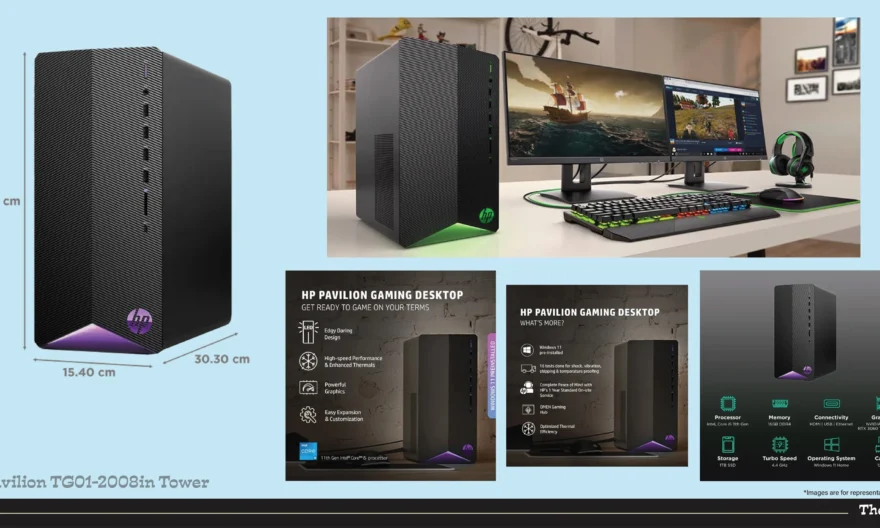
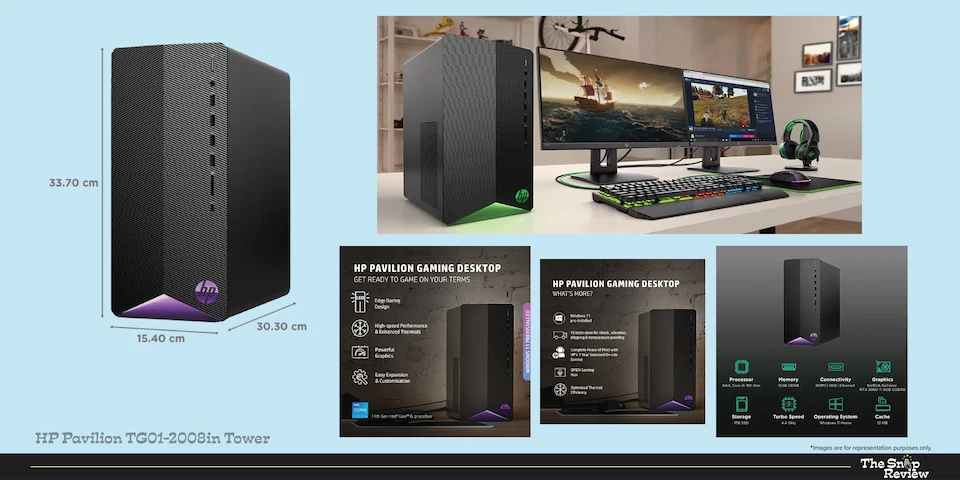
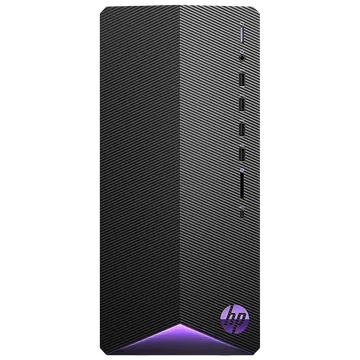
HP Pavilion TG01-2008in Tower
Where Serious Work Meets Weekend Gaming
Price: Rs. 75,994
Storage / RAM: 1TB SSD / 16GB || Display: 21.5-inch FHD IPS
Processor: Intel Core i5 || GPU: NVIDIA RTX 3060 Ti
Best for: Gaming, video editing, content creation
What We Like –
This HP Pavilion TG01-2008 isn’t trying to show off. It has one goal: to give you excellent graphics performance without the extra expense. And the RTX 3060 Ti does that job admirably.
NVIDIA’s RTX 3060 Ti is still a solid GPU in 2026. It handles 1080p gaming at high-ultra settings in most popular games with remarkable ease, handles 1440p gaming just fine, and provides enough computing power to run DaVinci Resolve, Premiere Pro, and Lightroom without constant buffering or preview drops. For those who pursue content editing as a hobby or take gaming seriously after work, this GPU is truly useful.
Its 1TB SSD is a great feature. Game libraries in 2026 are huge – Call of Duty alone can fill your entire drive. Having a terabyte of storage means you can install your game library and keep your project files safe without the hassle that often comes with 512GB of storage.
This tower form factor, while less attractive than an all-in-one, offers a practical advantage: the ease of upgrade. RAM can be increased, storage can be added, and eventually even the GPU can be replaced. You’re not buying a box – you’re buying a solid base.
What Could Be Better –
This Core i5 processor, despite its full capacity, can become a bottleneck in CPU-dependent tasks like 3D rendering, complex simulations, or streaming during gaming. If your workflow is intensively CPU-dependent, the processor can feel like the weakest link in a strong chain.
As a tower, this machine requires desk or floor space and requires more management for more cables. The HP Pavilion’s design is functional rather than aesthetic – it looks like an office computer, not a showpiece. Builders expecting RGB lighting panels will have to look elsewhere or have it custom-built to their needs.
Priced at Rs. 1,04,999, it falls into a competitive bracket where alternate options are also available. Ensure you’re comparing the total cost – you’ll still need a monitor, keyboard, and mouse.
Real Talk –
This machine is for people who work hard and have fun at the same time. It is for video editors who work for clients during the week and play open-world RPG games on the weekends. It is for content creators who are building YouTube channels alongside their day jobs. It is for students studying media or design and need creative tools. The RTX 3060 Ti gives you budget performance and with a 1TB SSD, you won’t feel the lack of storage. Croma at Rs. Available at Rs.1,04,999, this is a great machine for serious users.
HP Pavilion TG01-2008in Tower
Price: Rs. 75,994
Storage / RAM: 1TB SSD / 16GB || Display: 21.5-inch FHD IPS
Processor: Intel Core i5 || GPU: NVIDIA RTX 3060 Ti
Best for: Gaming, video editing, content creation
Disclaimer : We are a product review website providing honest opinions based on extensive research. Prices mentioned are approximate and may vary.
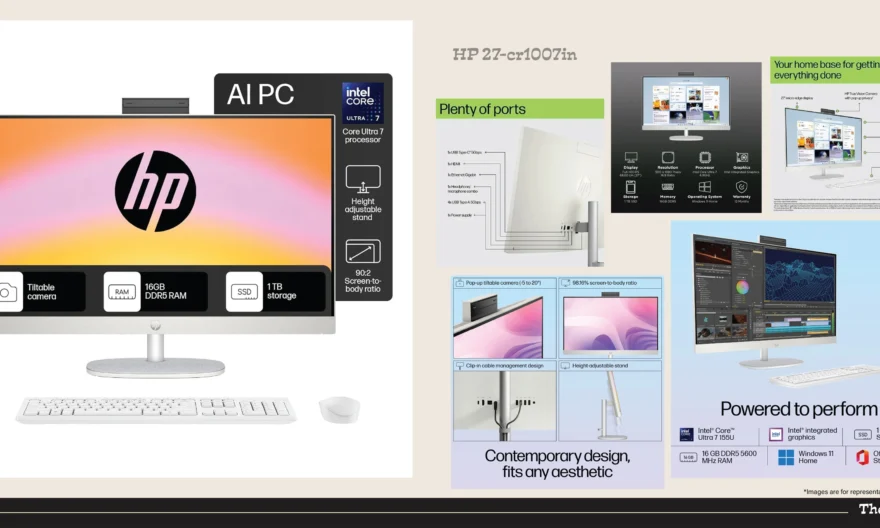
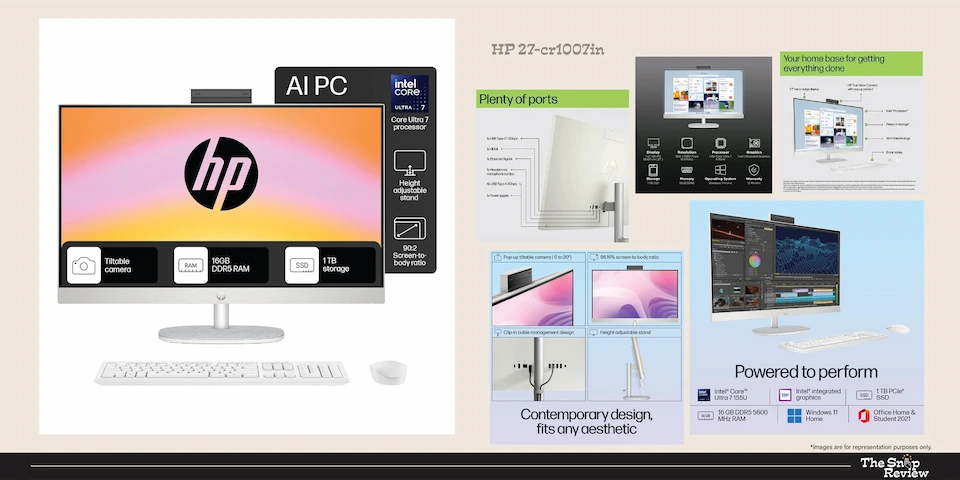
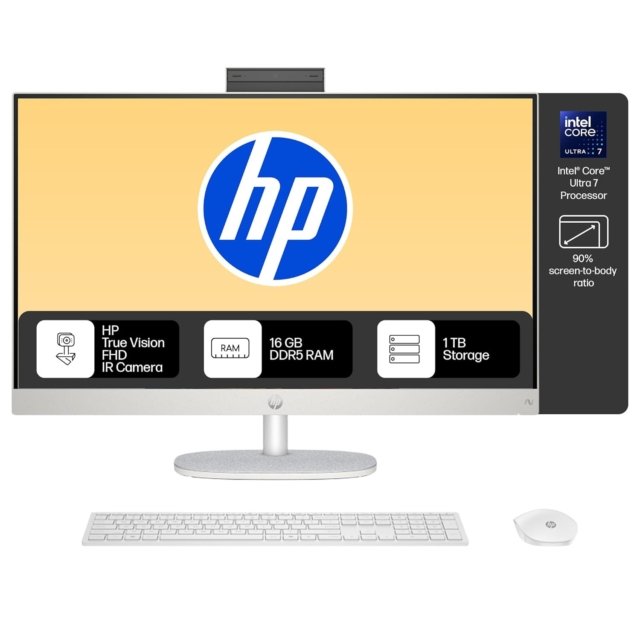
HP 27-cr1009in (All-in-One)
The Professional’s Desktop that Earns It’s Keeps
Price: Rs. 1,13,839
Storage / RAM: 1 TB SSD / 16GB || Display: 27-inch FHD IPS
Processor: Intel Core Ultra 7 || GPU: Intel Integrated Graphics
Best for: Professionals, multi-taskers, serious productivity
What We Like –
The 27-cr1009in occupies an interesting position in HP’s line-up – the same excellent all-in-one chassis as the Ultra 5 model, but powered by Intel’s Core Ultra 7 processor. This processor upgrade is even more significant than the specification sheets suggest.
The Intel Core Ultra 7 delivers noticeably more processing horsepower for multi-threaded workloads. If you’re running multiple applications simultaneously – a video call in one window, a spreadsheet in another, documents open in the background, and a browser session simultaneously consuming memory – the Ultra 7 handles it with ease without the typical slowdowns produced by lower-capacity chips under constant load.
A 1TB SSD provides working professionals with ample space. Document archives, presentation libraries, client project folders, software installations – one terabyte provides ample storage without the need for frequent maintenance.
Its all-in-one design is its aesthetic and practical strength. One cable. One beautiful display. No tower visible. For home offices or professional matters where presentation is important – client-facing spaces, neat home setups – the simplicity of this design is truly valuable.
What Could Be Better –
The Rs.18,000 premium price compared to the Core Ultra 5 model raises a fair question: is the processor upgrade alone enough to justify the difference? For very genuine, intensive workflows, yes. For general use, the Ultra 5 will feel more or less the same for everyday tasks. Before spending the extra money, decide for yourself which category you fall into.
This is the limitation of integrated graphics. For visual workloads, gaming, or GPU-accelerated creative applications, no amount of CPU power can compensate for the demands of a discrete GPU.
Priced at Rs. 1,13,839, this machine sits between two competing alternatives – the cheaper Ultra 5 model and the RTX 3060Ti tower – making it worth carefully considering its value proposition based on your budget.
Real Talk –
The HP 27-cr1009in is for professionals whose basic computing needs are met but who don’t need a dedicated graphics card. This desktop is perfect for financial analysts managing complex models, lawyers or consultants working with large documents in business applications, and small business owners who need reliable performance without the bulk of a tower setup. If your work requires processing power and your workspace requires tidiness, this all-in-one desktop fulfils both needs perfectly. Get it at Amazon for Rs. Available for Rs 1,13,839.
HP 27-cr1009in (All-in-One)
Price: Rs. 1,13,839
Storage / RAM: 1 TB SSD / 16GB || Display: 27-inch FHD IPS
Processor: Intel Core Ultra 7 || GPU: Intel Integrated Graphics
Best for: Professionals, multi-taskers, serious productivity
Disclaimer : We are a product review website providing honest opinions based on extensive research. Prices mentioned are approximate and may vary.
Lenovo Legion Tower 7i
When Dells Reliability Meets a Sensible Price
Price: Rs. 2,68,353
Storage / RAM: 1TB SSD / 16GB+ || Display: 14-inch FHD IPS
Processor: Intel Core i7 || GPU: NVIDIA RTX Series
Best for: High-end gaming, streaming, content creation at scale
What We Like –
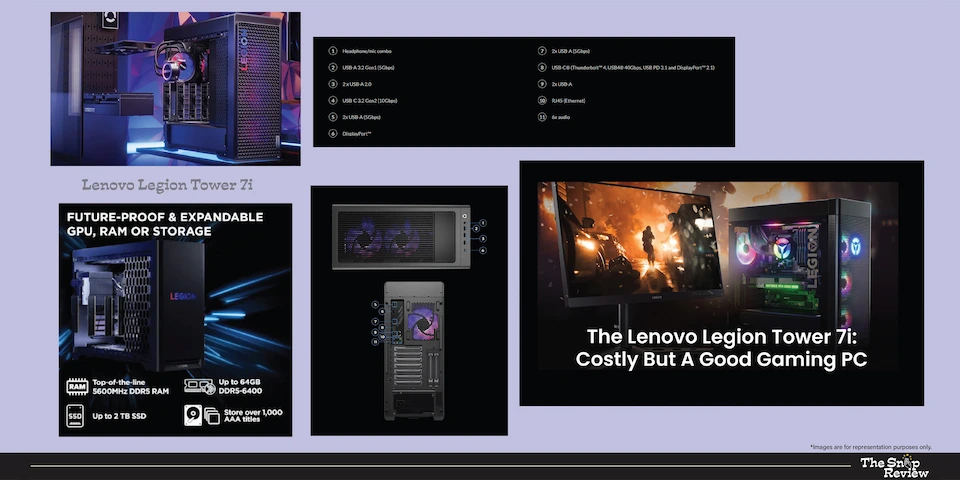
Lenovo’s Legion line exists for one reason: maximum performance without compromise. The Legion Tower 7i is like a race car when it comes to desktop computers – designed for performance, pushed to meet challenges, and delivering a highly satisfying experience when you do.
This combination of an Intel Core i7 processor and an RTX series GPU is capable of meeting every challenge in the modern computing world. High-frame-rate gaming at 1440p or 4K resolution? Absolutely! Gaming and streaming on Twitch > no problem! Editing 4K footage in DaVinci Resolve? It’s a breeze without the hassle of long rendering times common on mid-range machines.
The thermal engineering in Lenovo’s Legion series is truly impressive. The cooling system is designed for consistently high performance – not just peak performance that stops after 5 minutes. This machine delivers consistently high performance, even during long gaming sessions, creative tasks, or overnight rendering projects.
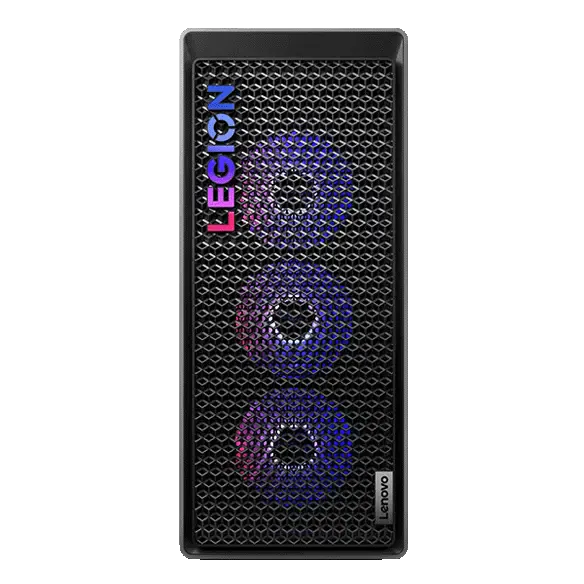
This Legion model’s design is completely gamer-centric: angular lines, RGB lighting options, and generous ventilation. If your workspace is your personal expression, this machine is a class apart. Its build quality is premium – it feels sturdy, and its panels feel solid, not plastic.
Upgradeability has been carefully considered. The tower design allows for future RAM expansion, additional storage drives, and eventually GPU swaps. You’re investing in a platform, not just a configuration.
What Could Be Better –
At a price of around Rs. 120,000, it’s a serious financial commitment. Its value proposition is strong from a performance perspective, but a genuine need may justify its purchase. Casual users, occasional gamers, or those who primarily browse and stream may find themselves paying too much for their actual needs.
Its size and weight are quite large. It’s truly a tower, requiring careful consideration of desk or floor space, cable management, and placement. Unlike HP’s alternatives, it doesn’t offer all-in-one functionality.
High performance generates more heat, which can lead to loud noise during intensive operations. Under load, the Legion Tower 7i is not a quiet machine. For open offices or shared spaces where people are often nearby, this information may be useful.
Power consumption at low consumption is significantly higher than that of productivity-focused machines. Particularly for frequent high-intensity users, factor electricity costs into the long-term ownership equation.
Real Talk –
The Lenovo Legion Tower 7i is built for a very specific buyer: the serious gamer or creative professional who is tired of mid-range hardware and is ready to invest in a machine that completely eliminates their limitations. Pro-level YouTube creators, competitive gamers, 3D artists, game developers, or anyone who wants to get really challenging work done will love this machine. For around Rs. 1,20,000 on Amazon India, you’re free from the hassle of compromising on performance. Make sure your usage reflects this – if it does, you won’t be disappointed.
Lenovo Legion Tower 7i
Price: Rs. 2,68,353
Storage / RAM: 1TB SSD / 16GB+
Processor: Intel Core i7 || GPU: NVIDIA RTX Series
Best for: High-end gaming, streaming, content creation at scale
Disclaimer : We are a product review website providing honest opinions based on extensive research. Prices mentioned are approximate and may vary.
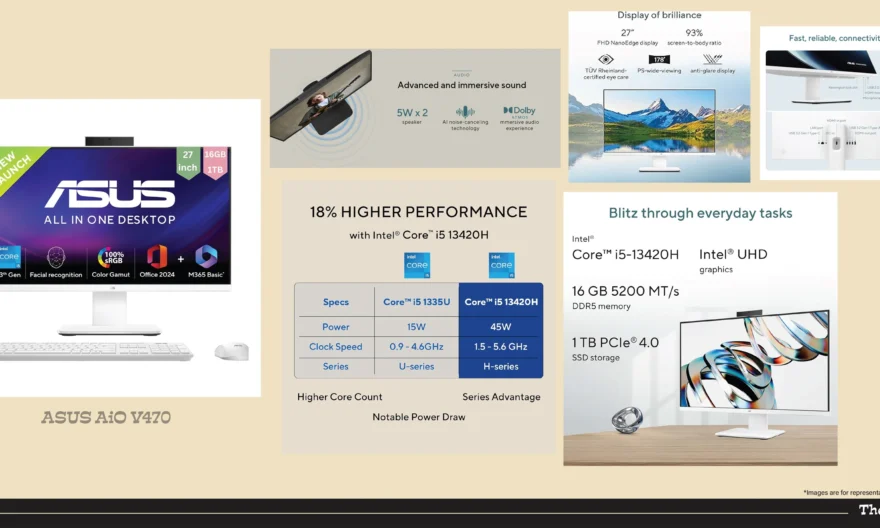
ASUS AiO V470 (All-in-One)
When The Desktop That Works for Everyone in the House
Price: Rs. 78,990
Storage / RAM: 1TB SSD / 16GB || Display: 14-inch FHD IPS
Processor: Intel Core i5 13th Gen || GPU: Intel UHD Graphics
Best for: Family Use, Students, Home Entertainment. WFH.
What We Like –
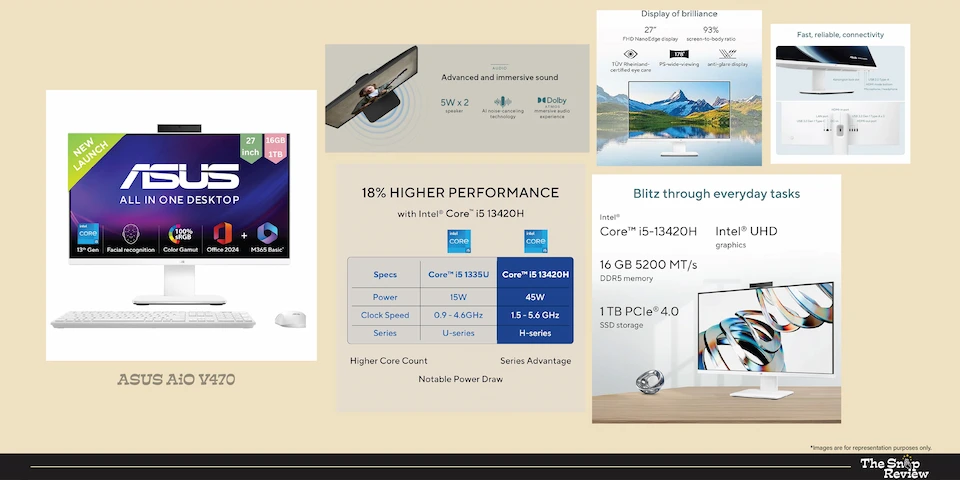
ASUS has been quietly making the best and most affordable all-in-one computers, and the V470 could be the best option in its category at this price. Its aim isn’t to beat benchmarks – it wants to be the best computer for as many people as possible, at a price that most families can easily afford.
An Intel Core i5 13th Gen processor is the perfect choice for this machine. This 13th Gen architecture is newer and more efficient than the 12th Gen architecture found in competing models at similar prices, giving the V470 a generational advantage that improves day-to-day responsiveness and improved longevity.
Getting 16GB of RAM and a 1TB SSD at this price is a great deal. Most competitors priced at Rs. 78,990 only offer 8GB of RAM and 512GB of storage. ASUS has made a wise decision here – the most important specifications for everyday use have been configured correctly, not compromised.
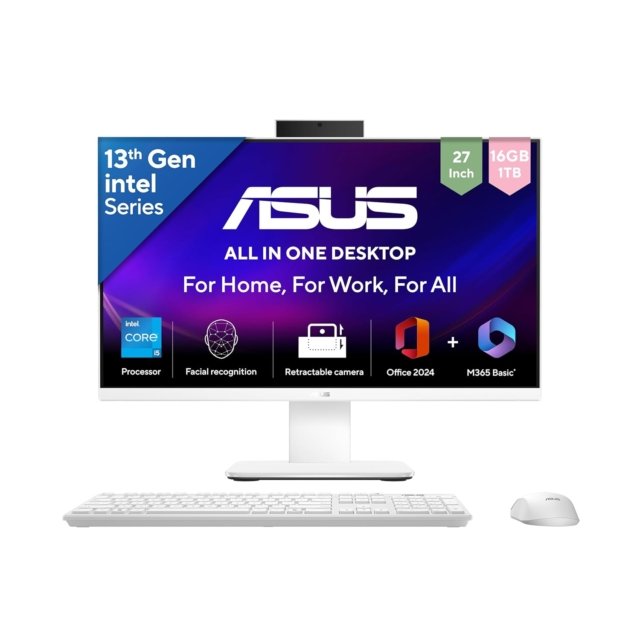
Its all-in-one design is especially well-suited for shared family use. There’s no tower to risk shaking, no tangled cables, and a clean display that fits easily into any shared desk or common area.
Kids can sit down and use it comfortably without the fear of complicated multi-component setup. Parents can get to work without the hassle of finding a remote, cable, or power button.
The ASUS V470 has excellent build quality. The stand mechanism is well designed, the chassis feels premium for its price, and the display quality is adequate for both content viewing and productivity tasks.
What Could Be Better –
Intel UHD integrated graphics have a maximum visual performance limit. Casual browsing-based games or gaming beyond decade-old titles isn’t the machine’s capacity. For households with at least one member who wants to play games seriously, a tower with dedicated graphics would be a better investment.
Its display is functional, but doesn’t stand out in terms of brightness or colour accuracy compared to premium alternatives. Its limitations become apparent for creative tasks that require colour accuracy. For general use, it’s perfectly fine.
Like all all-in-one computers, it has limited upgrade capacity. The 16GB of RAM and 1TB SSD are quite good for the starting price, but future expansion options are limited compared to a tower configuration. This machine is optimized for its current configuration, not as a long-term upgradeable platform.
Real Talk –
The ASUS AiO V470 is the most complete family desktop on this list. It has ample RAM and storage, and its price tag doesn’t overwhelm the household budget. It runs on a current-generation processor and fits easily into any home. It’s perfect for families looking for a standard computer setup, students who need solid performance for assignments and online studies, home-based professionals whose use is limited to productivity and communication, and homes where the computer is a communal resource, not a personal power tool. Get the Croma for Rs. Available at Rs. 78,990, this is a machine you can buy without any hesitation.
ASUS AiO V470 (All-in-One)
Price: Rs. 78,990
Storage / RAM: 1TB SSD / 16GB || Display: 14-inch FHD IPS
Processor: Intel Core i5 13th Gen || GPU: Intel UHD Graphics
Best for: Family Use, Students, Home Entertainment. WFH.
Disclaimer : We are a product review website providing honest opinions based on extensive research. Prices mentioned are approximate and may vary.
How to Choose the Right Desktop for you?
- What’s Your Primary Use Case?
This one question proves to be more helpful in choosing the right desktop for you than any specification.
- Everyday browsing, documents, and video calls: HP 27-cr1026in or ASUS AiO V470 deliver everything you need. Don’t overspend on processing power that will sit idle.
- Professional productivity and heavy multitasking: HP 27-cr1007in with Core Ultra 7 handles sustained multi-application workloads without bottlenecks.
- Gaming and content creation: HP Pavilion TG01-2008in provides RTX 3060 Ti performance at a reasonable price point. Lenovo Legion Tower 7i for those who want the ceiling.
- Family shared computer: ASUS AiO V470’s generous RAM, storage, and clean design make it ideal for multi-user households.
- Budget-conscious buyers: Dell Inspiron 5410 offers Dell reliability at entry-level pricing. Budget for a RAM upgrade.
- All-in-One vs Tower: The Real Difference
All-in-One advantages: Clean desk aesthetics, single cable setup, built-in display, compact footprint. Ideal for home offices, shared spaces, and users who value tidiness.
Tower advantages: Dedicated GPU support, upgradability, better thermal headroom for sustained performance, monitor flexibility. Ideal for gamers, creative professionals, and power users.
The choice isn’t about the best option, it’s about which option best serves your actual needs and location. If it’s right for you, there’s no compromise between the two.
- Processor Generations Matter More Than You Think
The new generation of processors is not only faster, but also more efficient, consumes less power, heats up less, and has better integrated graphics. In real-world usage, there’s a significant difference between 12th and 13th Gen Intel processors. When comparing similarly priced machines, consider processor speed along with specifications.
- The RAM and Storage Sweet Spots for 2026
- 16GB RAM is the minimum comfortable specification. 8GB will work but will feel constrained under modern workloads.
- SSD storage is non-negotiable. The performance difference versus HDD is dramatic and permanent.
- 512GB fills up faster than you expect. 1TB is the comfortable starting point for most users.
- Consider cloud storage costs as part of your total ownership budget if opting for lower local storage.
- Where to Buy: Platform Comparison
- Amazon India: Competitive pricing, frequent deals, strong delivery network, good return process. Best for price-conscious buyers and those outside major cities.
- Croma: Strong physical presence, in-store demo experience, good after-sales support, reliable warranty handling. Best for buyers who prefer seeing products before purchase.
- Reliance Digital: Extensive service network, competitive pricing on select models, EMI options. Strong presence in Tier 2 cities.
- Vijay Sales: Excellent for Western India buyers, competitive pricing, strong service centres, good on-ground customer support.
Our recommendation: Check prices across all platforms before purchasing. Festival and seasonal sales on Amazon India often beat in-store pricing significantly.
Frequently Asked Questions:
Q: Desktop vs Laptop — Which Should I Buy?
Desktops offer better performance at a lower price, better ergonomics for long-term use, larger display options, and better upgradeability. Laptops are portable. If your work or study is done at a desk and you have a dedicated space, a desktop is almost always the better option in terms of cost and performance. If you frequently move your computer, a laptop is the better choice. Both desktops and laptops are becoming increasingly popular in many homes these days.
Q: How Long Should a Desktop Last?
- Premium configurations (Core Ultra 7, RTX GPU): 6-8 years of productive life with light upgrades.
- Mid-range configurations (Core i5, integrated graphics): 4-6 years for typical workloads.
- Budget configurations (older processors, 8GB RAM): 3-4 years before performance starts feeling dated.
SSDs don’t wear out as quickly as HDDs, and modern processors don’t obsolete quickly enough for general use. In fact, their longevity is usually determined by RAM and storage, rather than processing power.
Q: Should I Buy an Extended Warranty?
Especially for All-in-One Systems – Yes! Its integrated components make repairs expensive and labour-intensive. The extended warranty on all-in-one systems is generally better than on tower systems, where individual components can be replaced independently at a lower cost. For tower configurations, evaluate your upgrade plans accordingly.
Q: What About Monitor, Keyboard, and Mouse for Tower Configurations?
When purchasing a tower configuration, budget an additional Rs.15,000-Rs.25,000 for a good monitor (24-27 inch FHD to QHD), keyboard, and mouse. Keep this in mind when comparing the total cost with all-in-one options. A tower priced at Rs.104,999 (including peripherals) may be more expensive overall than an all-in-one priced at Rs.95,499.
Q: Are Current-Gen Intel Processors Worth the Premium Over Older Generations?
If you’re planning on using your device for 5 years or more, then yes! Newer generation processors handle modern software more efficiently, heat up less due to better thermal management, and maintain better performance over time. When comparing machines of roughly the same price, newer processors are usually the better choice, unless the older generation machine has significantly better GPU or RAM specifications.
Disclosure: We are a product review website providing honest opinions based on extensive research and real-world user analysis. Prices mentioned are approximate may vary based on platform sales, offers, and location. We may earn a small commission if you purchase through our links, at no extra cost to you. This helps us keep our research independent and unbiased, allowing us to continue providing honest product reviews for Indian consumers.