Best Laptops Under 60000

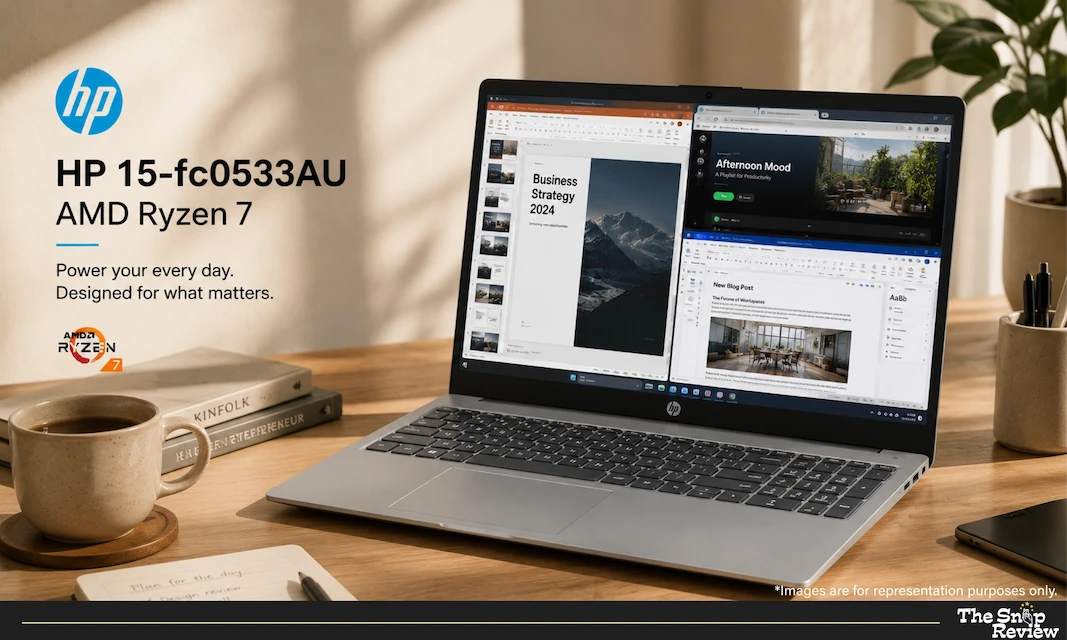
HP 15-fc0533AU AMD Ryzen 7

Best For: Best overall performance
Price Range: Rs. 59,990

What We Like –

The HP 15-fc0533AU is designed for those who truly need a laptop with powerful performance. With its AMD Ryzen 7 processor, this laptop makes no compromises on speed—and that matters a lot when you are working on emails, spreadsheets, and browser tabs simultaneously.

The Ryzen 7 is the real star here. It handles multitasking with great ease and efficiency. Whether you have 15 browser tabs open, are running Photoshop, or are on a video call simultaneously, the laptop doesn’t slow down at all. Even during heavy workloads, it remains quiet and cool.

At a price of Rs.59,990, you get premium performance comparable to a gaming laptop—the kind that usually costs over Rs.1,00,000. Whether you are a content creator, a programmer, or someone who works with heavy software, this laptop proves that you don’t need to spend a fortune to achieve professional-level performance.

What Could Be Better –

This laptop isn’t meant for gaming. Its integrated graphics are good for productivity and light creative tasks. If gaming is your priority, consider a different laptop. The battery life is decent—around 6–7 hours with mixed usage—but not exceptional. If you frequently move between rooms and work all day without plugging in, you might find yourself spending more time near a power outlet than you’d prefer.

Real Talk –

This laptop is for professionals who want powerful performance without spending a fortune. If your work is truly demanding and you have a budget of Rs. 60,000, the HP Ryzen 7 offers the best performance for the price. This laptop won’t let you down when the pressure is on.

HP 15-fc0533AU AMD Ryzen 7

HP 15-fc0533AU AMD Ryzen 7

Best For: Best overall performance
Price Range: Rs. 59,990

Disclaimer : We are a product review website providing honest opinions based on extensive research. Prices mentioned are approximate and may vary.

How to Choose the Right Laptop for Your Needs

Start With Your Primary Use Case

This is the biggest decision and most people get it wrong.

Heavy Multitasking (Browser Tabs, Multiple Apps)

Office Work Only (Excel, Email, Documents)

Light Use (Browsing, Documents, Video Calls)

Maximum Reliability & After-Sales Support

Balanced Everything (Not Best at One Thing, Good at Everything)

Processor Tiers Explained (No BS)

  • Intel Core i3 (13th Gen): Enough for student work and office use. Not for heavy creative work or coding compilation.
  • Intel Core 5 / AMD Ryzen 5: The sweet spot. Handles everything except demanding creative software. Recommended for most users.
  • Intel Core i5 / AMD Ryzen 7: High performance processors for demanding work like video editing, programming, data analysis. Only get this if you actually need the power.

Battery Life Reality Check

The spec sheet says 8 hours. Real-world? Here’s the truth:

Actual battery life depends on brightness, apps running, and your usage pattern.

At 50% brightness (normal office lighting): 6-7 hours for most laptops here.

At 80% brightness (typical use): 5-6 hours.

Heavy use (video, downloads): 4-5 hours.

For office workers: This is fine. Plug in at lunch, work until evening.

For students: Get a power bank. 10,000mAh is enough for an extra 2-3 hours.

RAM and Storage – The Upgrade Reality

All laptops here come with 8GB RAM and 256GB SSD at minimum.

Is 8GB enough?

  • For office use: Yes, perfectly fine.
  • For coding/multitasking: Push it, but manageable.
  • For future-proofing: 16GB is better, but costs Rs. 5,000-8,000 more.

Is 256GB storage enough?

  • For most users: Yes, Windows takes ~40GB, leaving 200GB.
  • For media creatives: No, upgrade to 512GB (adds Rs. 3,000-4,000).
  • Consider external SSDs if you need more – 500GB external SSD costs Rs. 2,000-3,000 anyway.

Cooling – The Feature Nobody Measures but Everyone Feels

When a laptop overheats, its performance slows down (this is known as ‘throttling’). Throttling means that the laptop slows down precisely when you need speed the most.

In this regard, the HP Ryzen 7 and MSI Modern 15 offer the best thermal management. These laptops stay cool even during heavy workloads—a factor that matters more in India’s hot climate than anywhere else.

The After-Sales Support Reality

India is big. Service availability varies.

Even the best support requires you to physically visit or ship the laptop. Keep that in mind.

Frequently Asked Questions

Is Rs. 60,000 a Good Budget for a Laptop in 2026?

Yes, absolutely. Here’s why:

  • You’re getting entry-level performance that was premium just 3-4 years ago.
  • Most of these laptops will last 4-5 years with normal use.
  • You’re not overpaying for a brand name or gaming features you don’t need.
  • The processors (Core i3 to Ryzen 7) are genuinely capable.

However: If you can stretch to Rs. 80,000-90,000, you get 16GB RAM and better displays. If your budget is locked at Rs. 60,000, these are your best options.

Should I Buy Now or Wait for Sales?

Laptop prices are surprisingly stable on Amazon and Flipkart. During Diwali, Great Indian Festival, or Amazon Prime Day, you might see Rs. 2,000-3,000 discounts. Not game-changing, but worth waiting for.

Best buying windows:

  • Diwali sales (Sept-Oct)
  • Great Indian Festival (Aug, Dec)
  • Amazon Prime Day (July)
  • Year-end clearance sales (December)

What’s the Best Place to Buy – Amazon, Flipkart, Croma, or Vijay Sales?

Amazon India: Fastest delivery, best return policy (30 days), most pricing competition. Flipkart: Similar to Amazon, sometimes better deals. Croma: Can see the laptop in person before buying (if store is nearby), decent return policy. Vijay Sales: Aggressive pricing, good for negotiation if buying in-store. Reliance Digital: More limited inventory but sometimes exclusive deals.

Our pick: Start with Amazon or Flipkart for price comparison. If you want to see the laptop before buying, visit Croma. Negotiate in-store at Vijay Sales for better deals.

How Long Will These Laptops Last?

With normal use (no spills, regular cleaning):

  • 3-5 years: Guaranteed, zero issues.
  • 5-7 years: Likely, minor software slowdowns possible.
  • 7+ years: Battery will probably need replacement, performance will lag behind new laptops.

By year 5-6, newer software will start demanding more, but these laptops won’t suddenly break.

Is Upgrading RAM or Storage Worth It?

RAM upgrade (8GB to 16GB): Costs Rs. 4,000-6,000 at purchase, or Rs. 3,000-4,000 later. Recommended if you multitask heavily or code. Skip if you’re on a budget.

Storage upgrade (256GB to 512GB): Costs Rs. 3,000-5,000. Only if you work with large files (video, design). For documents and everyday use, 256GB is fine (plus, you can always get an external SSD).

Can I Play Games On These Laptops?

Briefly honest answer:

  • Light games (Fortnite at low settings, PUBG mobile, indie games): Yes, barely.
  • Modern AAA games (Cyberpunk, Call of Duty): No, absolutely not.

If gaming is a priority, you need a dedicated GPU, which pushes the budget to Rs. 90,000+. These are productivity laptops.

What about overheating in Indian summer?

Real concern. Laptops get hot in summer heat.

Tips:

  • Keep the vents clear (dust blocks airflow)
  • Use a laptop stand (elevates the laptop for better airflow)
  • Clean the internal cooling fans every 3-4 months
  • Don’t use the laptop on soft surfaces (beds, couches) – they block vents
  • Consider a cooling pad (Rs. 1,000-2,000) if you work in peak summer

Should I Get Extended Warranty?

Standard warranty is 1-2 years. Extended warranty extends it to 3-4 years.

Worth it? Only if:

  • You’re accident-prone (drops, spills, etc.)
  • You work in a dusty environment
  • You plan to keep the laptop beyond 4 years

For careful users, standard warranty is enough. Accidents aren’t covered by extended warranty anyway.

Disclaimer: We are a product review website providing honest opinions based on extensive research and real-world usage analysis. Prices mentioned are approximate and may vary based on sales, offers, and location.