Best Desktops in India
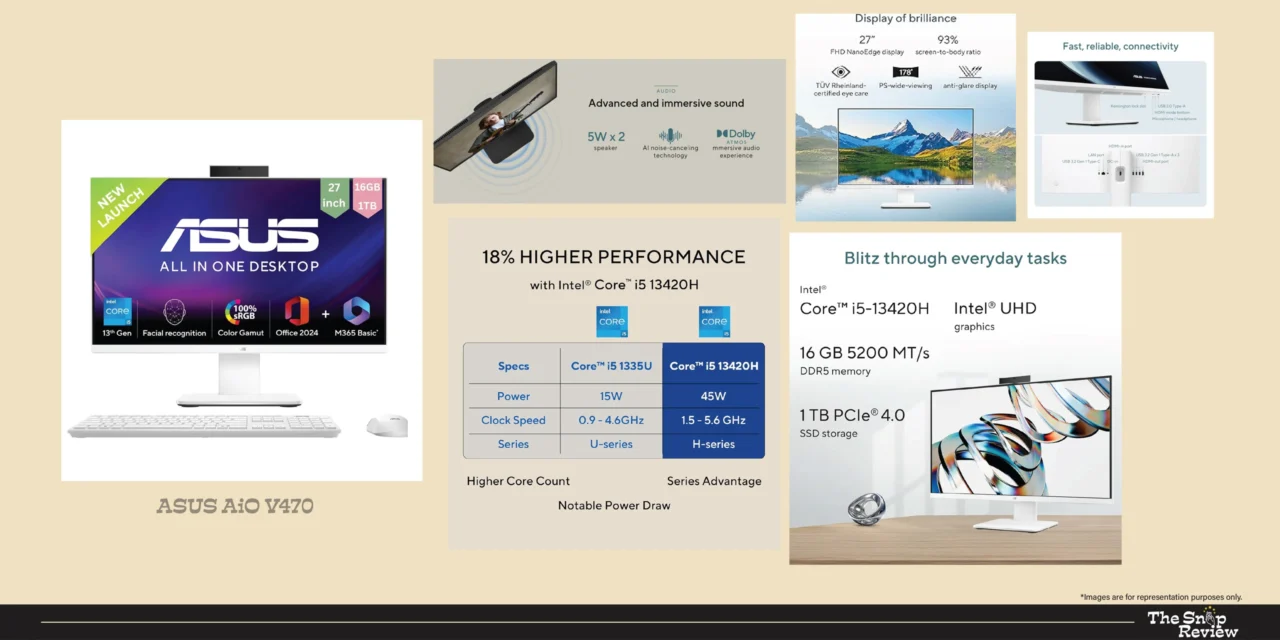
ASUS AiO V470 (All-in-One)
When The Desktop That Works for Everyone in the House
Price: Rs. 78,990
Storage / RAM: 1TB SSD / 16GB || Display: 14-inch FHD IPS
Processor: Intel Core i5 13th Gen || GPU: Intel UHD Graphics
Best for: Family Use, Students, Home Entertainment. WFH.
What We Like –
ASUS has been quietly making the best and most affordable all-in-one computers, and the V470 could be the best option in its category at this price. Its aim isn’t to beat benchmarks – it wants to be the best computer for as many people as possible, at a price that most families can easily afford.
An Intel Core i5 13th Gen processor is the perfect choice for this machine. This 13th Gen architecture is newer and more efficient than the 12th Gen architecture found in competing models at similar prices, giving the V470 a generational advantage that improves day-to-day responsiveness and improved longevity.
Getting 16GB of RAM and a 1TB SSD at this price is a great deal. Most competitors priced at Rs. 78,990 only offer 8GB of RAM and 512GB of storage. ASUS has made a wise decision here – the most important specifications for everyday use have been configured correctly, not compromised.
Its all-in-one design is especially well-suited for shared family use. There’s no tower to risk shaking, no tangled cables, and a clean display that fits easily into any shared desk or common area.
Kids can sit down and use it comfortably without the fear of complicated multi-component setup. Parents can get to work without the hassle of finding a remote, cable, or power button.
The ASUS V470 has excellent build quality. The stand mechanism is well designed, the chassis feels premium for its price, and the display quality is adequate for both content viewing and productivity tasks.
What Could Be Better –
Intel UHD integrated graphics have a maximum visual performance limit. Casual browsing-based games or gaming beyond decade-old titles isn’t the machine’s capacity. For households with at least one member who wants to play games seriously, a tower with dedicated graphics would be a better investment.
Its display is functional, but doesn’t stand out in terms of brightness or colour accuracy compared to premium alternatives. Its limitations become apparent for creative tasks that require colour accuracy. For general use, it’s perfectly fine.
Like all all-in-one computers, it has limited upgrade capacity. The 16GB of RAM and 1TB SSD are quite good for the starting price, but future expansion options are limited compared to a tower configuration. This machine is optimized for its current configuration, not as a long-term upgradeable platform.
Real Talk –
The ASUS AiO V470 is the most complete family desktop on this list. It has ample RAM and storage, and its price tag doesn’t overwhelm the household budget. It runs on a current-generation processor and fits easily into any home. It’s perfect for families looking for a standard computer setup, students who need solid performance for assignments and online studies, home-based professionals whose use is limited to productivity and communication, and homes where the computer is a communal resource, not a personal power tool. Get the Croma for Rs. Available at Rs. 78,990, this is a machine you can buy without any hesitation.
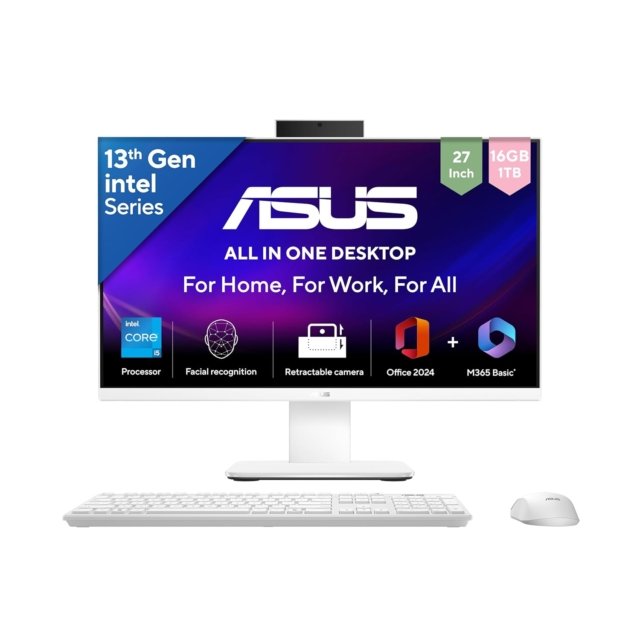
ASUS AiO V470 (All-in-One)
Price: Rs. 78,990
Storage / RAM: 1TB SSD / 16GB || Display: 14-inch FHD IPS
Processor: Intel Core i5 13th Gen || GPU: Intel UHD Graphics
Best for: Family Use, Students, Home Entertainment. WFH.
Disclaimer : We are a product review website providing honest opinions based on extensive research. Prices mentioned are approximate and may vary.
How to Choose the Right Desktop for you?
- All-in-One vs Tower: The Real Difference
All-in-One advantages: Clean desk aesthetics, single cable setup, built-in display, compact footprint. Ideal for home offices, shared spaces, and users who value tidiness.
Tower advantages: Dedicated GPU support, upgradability, better thermal headroom for sustained performance, monitor flexibility. Ideal for gamers, creative professionals, and power users.
The choice isn’t about the best option, it’s about which option best serves your actual needs and location. If it’s right for you, there’s no compromise between the two.
- Processor Generations Matter More Than You Think
The new generation of processors is not only faster, but also more efficient, consumes less power, heats up less, and has better integrated graphics. In real-world usage, there’s a significant difference between 12th and 13th Gen Intel processors. When comparing similarly priced machines, consider processor speed along with specifications.
- The RAM and Storage Sweet Spots for 2026
16GB RAM is the minimum comfortable specification. 8GB will work but will feel constrained under modern workloads.
SSD storage is non-negotiable. The performance difference versus HDD is dramatic and permanent.
512GB fills up faster than you expect. 1TB is the comfortable starting point for most users.
Consider cloud storage costs as part of your total ownership budget if opting for lower local storage.
- Where to Buy: Platform Comparison
Amazon India: Competitive pricing, frequent deals, strong delivery network, good return process. Best for price-conscious buyers and those outside major cities.
Croma: Strong physical presence, in-store demo experience, good after-sales support, reliable warranty handling. Best for buyers who prefer seeing products before purchase.
Reliance Digital: Extensive service network, competitive pricing on select models, EMI options. Strong presence in Tier 2 cities.
Vijay Sales: Excellent for Western India buyers, competitive pricing, strong service centres, good on-ground customer support.
Our recommendation: Check prices across all platforms before purchasing. Festival and seasonal sales on Amazon India often beat in-store pricing significantly.
Frequently Asked Questions:
Q: Desktop vs Laptop — Which Should I Buy?
Desktops offer better performance at a lower price, better ergonomics for long-term use, larger display options, and better upgradeability. Laptops are portable. If your work or study is done at a desk and you have a dedicated space, a desktop is almost always the better option in terms of cost and performance. If you frequently move your computer, a laptop is the better choice. Both desktops and laptops are becoming increasingly popular in many homes these days.
Q: How Long Should a Desktop Last?
Premium configurations (Core Ultra 7, RTX GPU): 6-8 years of productive life with light upgrades.
Mid-range configurations (Core i5, integrated graphics): 4-6 years for typical workloads.
Budget configurations (older processors, 8GB RAM): 3-4 years before performance starts feeling dated.
SSDs don’t wear out as quickly as HDDs, and modern processors don’t obsolete quickly enough for general use. In fact, their longevity is usually determined by RAM and storage, rather than processing power.
Q: Should I Buy an Extended Warranty?
Especially for All-in-One Systems – Yes! Its integrated components make repairs expensive and labour-intensive. The extended warranty on all-in-one systems is generally better than on tower systems, where individual components can be replaced independently at a lower cost. For tower configurations, evaluate your upgrade plans accordingly.
Q: What About Monitor, Keyboard, and Mouse for Tower Configurations?
When purchasing a tower configuration, budget an additional Rs.15,000-Rs.25,000 for a good monitor (24-27 inch FHD to QHD), keyboard, and mouse. Keep this in mind when comparing the total cost with all-in-one options. A tower priced at Rs.104,999 (including peripherals) may be more expensive overall than an all-in-one priced at Rs.95,499.
Q: Are Current-Gen Intel Processors Worth the Premium Over Older Generations?
If you’re planning on using your device for 5 years or more, then yes! Newer generation processors handle modern software more efficiently, heat up less due to better thermal management, and maintain better performance over time. When comparing machines of roughly the same price, newer processors are usually the better choice, unless the older generation machine has significantly better GPU or RAM specifications.
Disclosure: We are a product review website providing honest opinions based on extensive research and real-world user analysis. Prices mentioned are approximate may vary based on platform sales, offers, and location. We may earn a small commission if you purchase through our links, at no extra cost to you. This helps us keep our research independent and unbiased, allowing us to continue providing honest product reviews for Indian consumers.